Trackers
Getting Started with Trackers
Our SDK enables web-based tracking and works with plain JavaScript or any framework (React, Vue, Angular, Svelte).
Get Your API Key
Find your API key in Settings → API Keys. Use your public key (starts with pk_) for tracking.
Installation
Option 1: NPM
Install using npm, pnpm, or bun:
npm i @cashin/js-sdkInitialize the tracker early in your application, like at the top of index.tsx or main.tsx:
import { init } from '@cashin/js-sdk'

init('your-partner-public-api-key')Option 2: CDN Script Tag
Add this script at the top of your HTML page:
<script src="https://cdn.jsdelivr.net/npm/@cashin/js-sdk/dist/index.global.js"></script>
<script>
  tracker.init('your-partner-public-api-key');
</script>For better performance, add the async attribute to the script tag.
Autotracking
Autotracking is enabled by default and captures page views and clicks. To disable it during initialization:
init('your-partner-public-api-key', { autoTrack: false })Manual Event Tracking
For custom events or when autotracking is disabled:
import { init } from '@cashin/js-sdk'

export const tracker = init('your-partner-public-api-key')

// Track custom events
tracker.track('button_clicked', {
  message: 'User clicked the signup button'
})Verify Setup
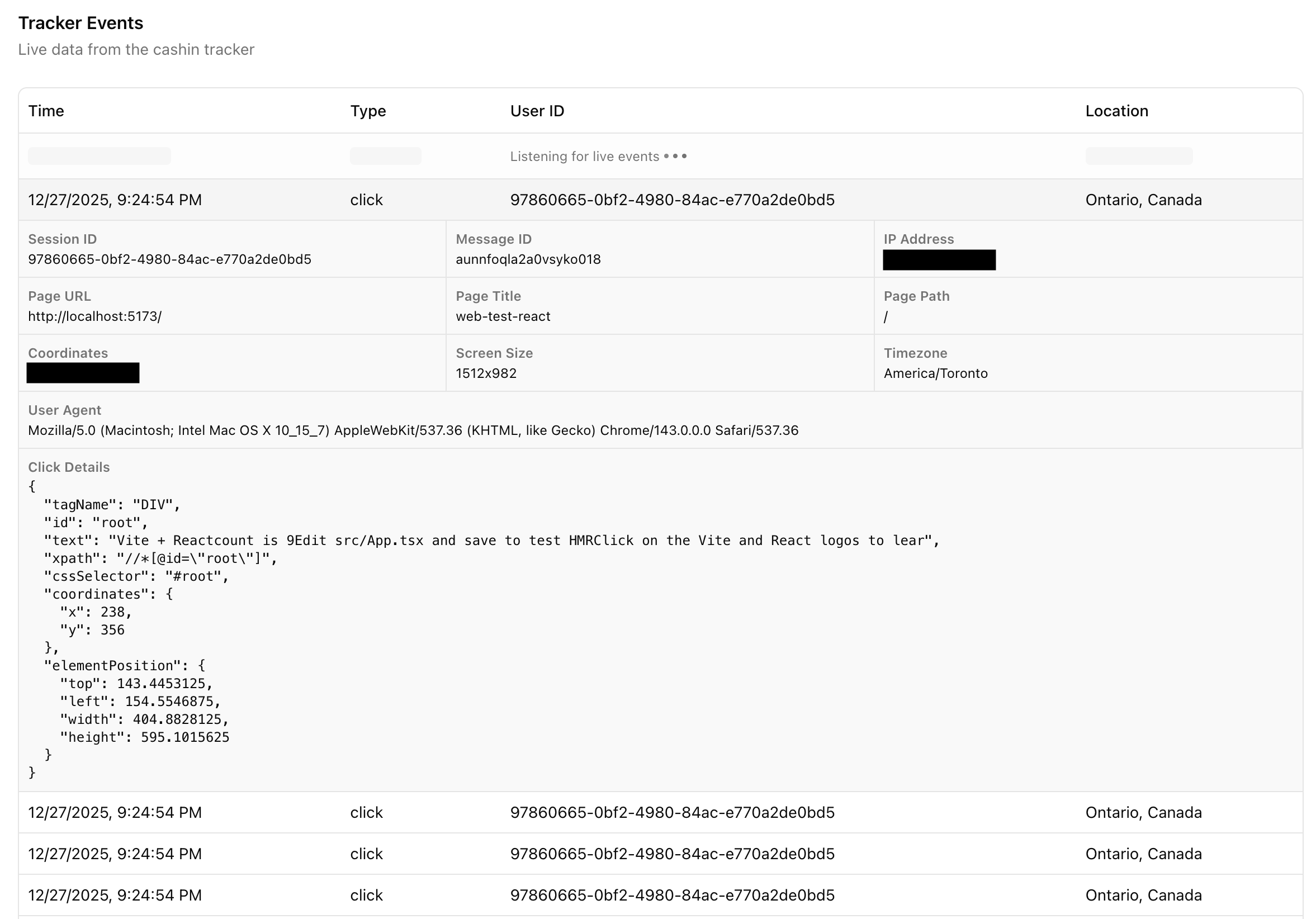
Check the tracking dashboard to see live events appearing. You should see page views and any tracked events.
Why trackers
Understand your Users, better then they understand themselves

What is Trackers?
Trackers are like helpful observers that understand user behaviour on your site, connecting actions to sessions and campaigns. They're a better system than traditional cookies, more accurate, privacy-friendly, and focused on improving experiences without being intrusive. Think of trackers as smart assistants noting what catches attention (clicks) and what doesn't, helping businesses create better shops.
Why are Trackers Important?
They reveal patterns to boost sales and rewards, all while respecting privacy (no creepy tracking).
-
For Marketing Teams: See what grabs attention to refine campaigns.
-
For Finance Teams: Link behaviours to revenue, like which clicks lead to buys.
-
For Developers: Easy endpoints (e.g.,
POST /partner/v1/tracker) and scripts for setup.
Trackers work with sessions (to remember users) and campaigns (to tie actions to deals), providing insights without storing personal data long-term.
Understanding User Behaviour
Trackers watch how users interact, like pages viewed, items clicked, or time spent, without identifying individuals. This helps spot what works (e.g., popular products) and what doesn't (e.g., ignored buttons), all in a non-scary way: It's about improving your site, not spying.
-
Better Than Cookies: Unlike cookies that can feel invasive, trackers focus on helpful patterns and respect privacy settings.
-
Example: A user clicks gadgets but ignores clothes, trackers note this to suggest better layouts.
-
Endpoint:
POST /partner/v1/trackerto create custom trackers.
Default vs. Custom Trackers
CashIn offers ready-to-use default trackers for common needs, or you can create custom trackers for unique behaviours. Defaults are quick, customs give flexibility but may need more setup.
-
Default Trackers: Built-in options like page_view (tracks visits), click_tracking (notes clicks), or scroll_tracking (sees engagement). Great for starting fast.
-
Custom Trackers: Add your own scripts to track specific things, like form interactions. CashIn analyzes them for privacy (via PIIC) to keep everything safe.
-
Example: Use default click_tracking for quick button insights; go custom to track video watches on your site.
|
Aspect |
Default Trackers |
Custom Trackers |
|---|---|---|
|
Setup |
Instant one API call |
Upload script + configuration |
|
Use Cases |
Standard behaviours (clicks, views) |
Unique needs (e.g., custom events) |
|
Privacy |
Built-in PIIC compliance |
Auto-analyzed for privacy risks |
|
Best For |
Quick starts |
Advanced tracking |
-
Marketing: Defaults for fast campaign tests; customs for branded interactions.
-
Finance: Defaults give reliable metrics; customs track high-value behaviours.
-
Developers: Defaults via /tracker/new; customs add scripts with PIIC checks.
|
Audience |
Benefit |
Example |
|---|---|---|
|
Marketing |
Spot trends |
See popular clicks to promote hot items in campaigns. |
|
Finance |
Revenue insights |
Track which behaviours lead to high-value sales. |
|
Developers |
Simple Tracking |
Embed scripts that log clicks automatically. |
Connecting Data to Session and Campaigns
Trackers link behaviours to sessions (user journeys) and campaigns (active deals). For instance, if a user clicks a campaign link, the tracker records it against their session, showing what they engage with or skip.
-
What They Click (And Don’t): Clicks reveal interests (e.g., added to cart); non-clicks show misses (e.g., ignored banner).
-
Example: In a session, tracker sees clicks on a deal but no buy, connect to campaign for tweaks.
-
Behaviour Tracking in Scripts: Use embedded scripts (e.g., cashin-tracker.js) to capture actions like scrolls/clicks seamlessly.
Cross-Vendor Insights with PIIC
Trackers can help understand customer behaviour across other vendors in the CashIn network without pinpointing specific stores. Using PIIC (anonymized data), you get higher-level patterns, like "shoppers who browse gadgets often buy accessories later." This gives a bigger picture of habits while keeping privacy intact.
-
How It Works: PIIC cleans data to remove vendor details but preserves trends for network-wide learning.
-
Example: Learn that "tech enthusiasts spend 20% more on weekends" without knowing exact stores use it to time your campaigns.
-
Benefits: Marketing spots broader trends; finance predicts market shifts; devs integrate via safe APIs.